
Rewrite a weak bullet point into three stronger versions and browse 60+ resume action verbs by category.
ATS tool
See What an ATS Sees in Your Resume
Before a recruiter reads your CV, an ATS resume parser turns it into plain text. Upload your file and this viewer shows you that text line by line, with the contact details, section headings and dates it can recognise.
If something is missing or out of order here, it is missing for the recruiter's software too.
- Free tool
- No signup
- Results in seconds
- Nothing leaves your device
- PDF and DOCX
How an ATS reads a resume
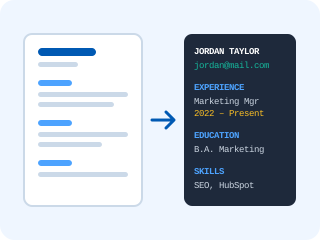
An applicant tracking system does not look at your resume the way a person does. It first extracts the raw text from the file, reading each line from left to right across the whole page. It then tries to split that text into fields: your name and contact details from the top, then each section according to its heading, then job titles, employers and dates inside the experience section.
Everything downstream depends on that first step. Keyword matching, the experience calculation and the ranking a recruiter sees are all built on the extracted text. If a date lands next to the wrong employer or your email never comes through, no amount of good content makes up for it.
Common resume parsing errors
- Mixed-up lines. A sidebar of skills next to your experience is read across the page, so each line of your job history is glued to a skill.
- Missing contact details. Email and phone placed in the page header, a text box or behind icons often never reach the parser.
- Unrecognised headings. "My Journey" or "What I Bring" are not mapped to Experience or Skills, so that content is misfiled or ignored.
- Symbols instead of letters. Icon fonts and decorative typefaces extract as boxes or "(cid:12)" codes.
- An empty document. A scanned or image-only PDF contains no text at all.
Fonts are a common culprit: the ATS font and format checker tells you whether yours is safe.
How to fix columns and tables
Columns and tables cause most parsing errors, and the fix is the same for both: rebuild the content as one column that reads from top to bottom.
- Move sidebar content (skills, languages, certifications) into its own section below your experience.
- Replace tables with a heading per role followed by bullet points, and put dates on the same line as the job title.
- Take contact details out of the header and place them as plain text directly under your name.
- Replace skill bars and icons with words: "Python (advanced)" carries a keyword, a bar does not.
- Upload the new version here and check that the extracted text reads in the right order.
The fastest route is often a clean start. Our ATS friendly resume templates are single-column and parse cleanly, or you can rebuild in the free resume builder.
Frequently asked questions
Why does the ATS not read my resume?
Usually for one of four reasons: the file is a scan or an image-based PDF with no real text in it; a two-column layout makes the parser mix lines from both columns; contact details sit in a page header, text box or image the parser skips; or an icon or decorative font turns characters into symbols. The viewer shows which of these applies to your file.
How do I check if my resume is ATS readable?
Upload it above and read the extracted text from top to bottom. If your name and contact details come first, each job title sits next to its employer and dates, and the section headings are recognised, an ATS can read it. If lines from different parts of the page are mixed together, it cannot.
How do I fix a resume parsing error?
Move to a single-column layout, replace tables with plain headings and bullet lists, put your contact details as plain text under your name, use standard section names (Experience, Education, Skills), and export a text-based PDF or DOCX from Word or Google Docs instead of a design tool.
Is this a real ATS parser?
It reproduces the first step every ATS performs: converting your file into plain text, reading each line across the full width of the page. It then looks for the fields parsers extract, such as contact details, section headings and dates. Commercial systems like Workday or Greenhouse add their own field mapping on top, but if the text comes out wrong here, it comes out wrong there too.
Should I send my resume as PDF or Word?
Either works with modern systems as long as the file contains real text. A PDF exported from Word or Google Docs keeps your layout intact; a DOCX is safest for older systems. Avoid PDFs exported as images, and follow the employer's instructions when they name a format.
Is my resume uploaded to a server?
No. The file is opened and converted to text inside your browser tab. Nothing is sent to our servers or stored, and the result disappears when you close the page.
Your resume parses cleanly? Now score it
Upload your CV for a free ATS compatibility score, a keyword gap report against a job description and a prioritised list of fixes. No signup, nothing stored.
More free career tools
Paste your resume to flag clichés, weak verbs and filler words, with a stronger replacement for every one.
Fill in your details, pick one of four templates and copy a ready-to-paste HTML email signature.
See all 13 on the free resume tools hub.